Static and Dynamic Arrays  

  • Static array:

    • fixed array size

  • Dynamic array:

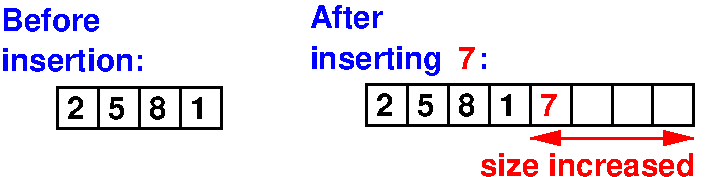
    • Array size can increase automatically with insertion

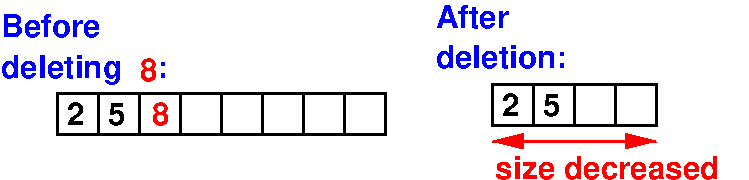
    • Array size can decrease automatically with deletion

  Dynamic array in C++: vector  

  • Dynamic array in C++ is called: vector

  • Defining a vector:

      #include <vector>
    
      vector<int> vector1(5);
      // Defines a vector of int with initial size of 5
    
      vector<int> vector2 = {1, 2, 3, 4, 5};
      // Defines a vector of int with initial values of 1,2,3,4,5
    

  • Accessing values stored in a vector:

      vector2[0]                  // Access the first element
      vector2[1]                  // Access the second element
      vector2[vector1.size()-1]   // Access the last element
    

  Dynamic array in C++: vector  

  • Inserting values into a vector:

      vector2.push_back(4);                 // Appends 4 to end of vector
      vector2.insert(vector2.begin(), 4);   // Inserts 4 to start of vector
    

  • Deleting values from a vector:

      vector2.pop_back();             // Removes the last value from vector
      vector2.erase(vector2.begin()); // Removes the first value from vector
    

  • Updating values stored a vector:

      vector2[2] = 99;   // Updates the value in vector2[2] to 99
    

Demo program: vector.cc

  Dynamic array in Python: list  

  • Dynamic array in Python is called: list

  • Defining a list:

     Syntax:
        
           list1 = []
           // Defines an empty list
    
           list2 = [1, 2, 3, 4, 5];
           // Defines a list with initial values of 1,2,3,4,5
    

  • Accessing values stored in a list:

      list2[0]                // Access the first element
      list2[1]                // Access the second element
      list2[len(list2)-1]     // Access the last element
    

  Dynamic array in Python: list  

  • Inserting values into a list:

      list2.append(4);      // Appends 4 to end of list
      list2.insert(0, 4);   // Inserts 4 to start of list
    

  • Deleting values from a list:

      list2.pop(len(list2)-1);   // Removes the last value from list
      list2.pop(0);              // Removes the first value from list
    

  • Updating values stored a list:

      list2[2] = 99;   // Updates the value in list2[2] to 99
    

Demo program: list.py