Removing elements from
an ArrayList object
- Methods used to
update
and remove
an element in
an ArrayList object:
  set(int index, E e):
         Replace the element at the position index with e
	 Returns the old value that was stored in that element.


  remove(int index):
         Removes the element at the position index
	 from this list (and returns it)
	 Returns the old value that was stored in that element.

  remove(E e):
         Removes the first occurrence of the element e
	 from this list.
	 Returns true if successful; otherwise, returns false
|
|
set(
index ,
elem
)
- set( index,
elem )
replaces the
element
stored at the
index
"index"
with element
"elem"
and
returns
the
old
value.
Before
set(1,
"AAA"):
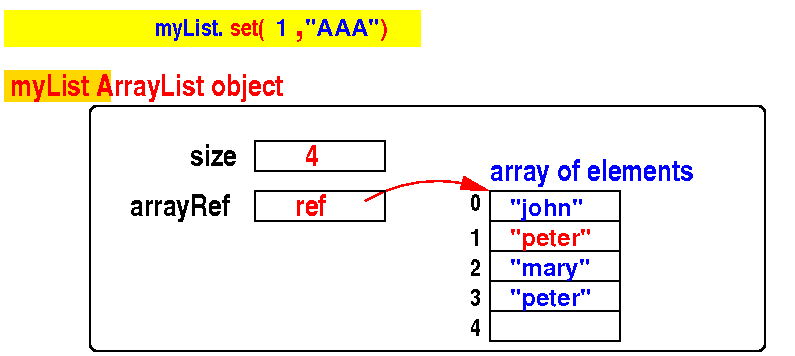
After
set(1,
"AAA"):
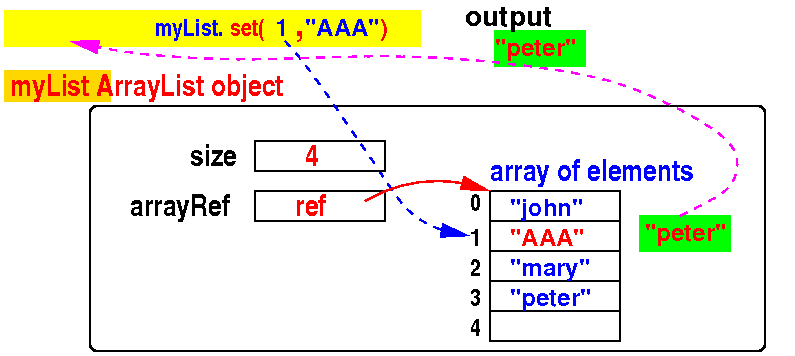
|
set(
index ,
elem
)
- Syntax of
set(
index ,
elem ):
myList.set(index , elem);
|
- Example:
replace
the element at
index
1
with "AAA"
    public static void main(String[] args)
    {
        ArrayList<String> myList = new ArrayList<>();

        myList.add("john");
	myList.add("peter"); // Index 1
        myList.add("mary");
	myList.add("peter");

        System.out.println( myList.set(1, "AAA") ); // peter
        System.out.println( myList ); // [john,AAA,mary,peter]
    }
|
|
DEMO:
emo/11-arrayList/04-update/Set.java
remove(
index
)
- remove( index )
removes the
element
stored at the
index
"index" and
returns it.
Before
remove(1):
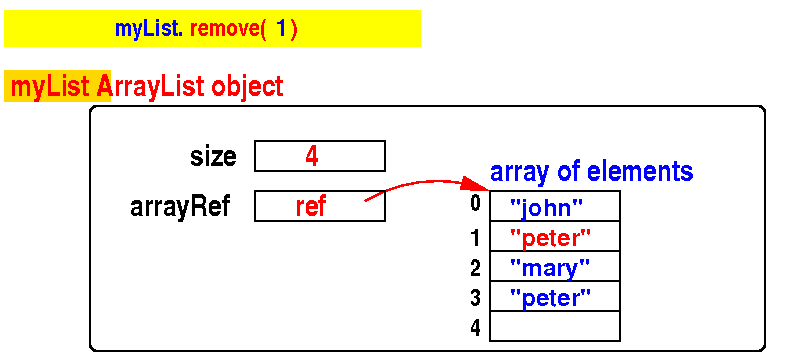
After
remove(1):
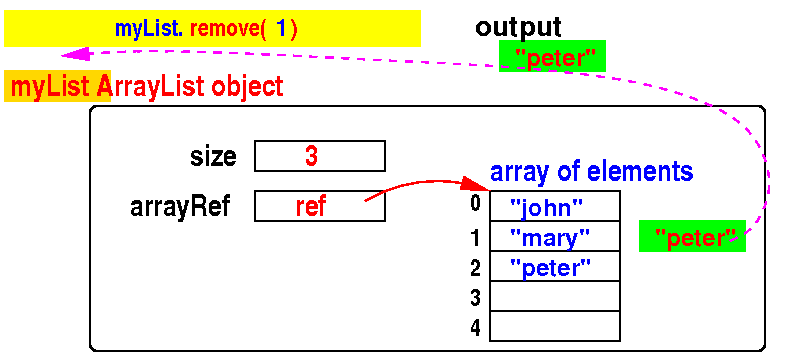
|
remove(
index
)
- Syntax of
remove(
index ):
- Example:
romove the element at
index
1 from
an ArrayList<String>
object:
    public static void main(String[] args)
    {
        ArrayList<String> myList = new ArrayList<>();

        myList.add("john");
	myList.add("peter"); // Index 1
        myList.add("mary");
	myList.add("peter");

        System.out.println( myList.remove(1) ); // peter
        System.out.println( myList ); // [john,mary,peter]
    }
|
|
DEMO:
emo/11-arrayList/04-update/Remove1.java
Using
remove(index)
to remove
all occurences in an ArrayList
(a frequent question in
AP CS exams)
- Problem description:
remove
all occurences of
"peter" in
an ArrayList:
    public static void main(String[] args)
    {
        ArrayList<String> myList = new ArrayList<>();

        myList.add("john");
	myList.add("peter"); // occurence 1
        myList.add("mary");
	myList.add("peter"); // occurence 2

        // Remove all occurence of "peter" in myList
	int indexPeter = myList.indexOf("peter");    // Find "peter"

	while ( indexPeter != -1 )
	{
	     myList.remove( indexPeter );           // If found, remove
	     indexPeter = myList.indexOf("peter");  // Repeat
	}
	System.out.println(myList);
    }
|
|
Using
remove(index)
to remove
all occurences in an ArrayList
(a frequent question in
AP CS exams)
- Find
the
first
occurence:
    public static void main(String[] args)
    {
        ArrayList<String> myList = new ArrayList<>();

        myList.add("john");
	myList.add("peter"); // occurence 1
        myList.add("mary");
	myList.add("peter"); // occurence 2

        // Remove all occurence of "peter" in myList
	int indexPeter = myList.indexOf("peter");    // Find "peter"

	while ( indexPeter != -1 )
	{
	     myList.remove( indexPeter );           // If found, remove
	     indexPeter = myList.indexOf("peter");  // Repeat
	}
	System.out.println(myList);
    }
|
|
Using
remove(index)
to remove
all occurences in an ArrayList
(a frequent question in
AP CS exams)
-
As long as we can
still
find an
occurence:
    public static void main(String[] args)
    {
        ArrayList<String> myList = new ArrayList<>();

        myList.add("john");
	myList.add("peter"); // occurence 1
        myList.add("mary");
	myList.add("peter"); // occurence 2

        // Remove all occurence of "peter" in myList
	int indexPeter = myList.indexOf("peter");    // Find "peter"

	while ( indexPeter != -1 )  // "peter" was found in myList
	{


	}
	System.out.println(myList);
    }
|
|
Using
remove(index)
to remove
all occurences in an ArrayList
(a frequent question in
AP CS exams)
-
Delete that
occurence:
    public static void main(String[] args)
    {
        ArrayList<String> myList = new ArrayList<>();

        myList.add("john");
	myList.add("peter"); // occurence 1
        myList.add("mary");
	myList.add("peter"); // occurence 2

        // Remove all occurence of "peter" in myList
	int indexPeter = myList.indexOf("peter");    // Find "peter"

	while ( indexPeter != -1 )  // "peter" was found in myList
	{
	     myList.remove( indexPeter );          // If found, remove

	}
	System.out.println(myList);
    }
|
|
Using
remove(index)
to remove
all occurences in an ArrayList
(a frequent question in
AP CS exams)
-
Check if there are any
more
occurences:
    public static void main(String[] args)
    {
        ArrayList<String> myList = new ArrayList<>();

        myList.add("john");
	myList.add("peter"); // occurence 1
        myList.add("mary");
	myList.add("peter"); // occurence 2

        // Remove all occurence of "peter" in myList
	int indexPeter = myList.indexOf("peter");    // Find "peter"

	while ( indexPeter != -1 )  // "peter" was found in myList
	{
	     myList.remove( indexPeter );          // If found, remove
	     indexPeter = myList.indexOf("peter"); // Repeat
	}
	System.out.println(myList);
    }
|
|
DEMO:
demo/11-arrayList/04-update/Remove1All.java
Using
remove(index)
to remove
all items > "ppp" in an ArrayList
(a frequent question in
AP CS exams)
- Problem description:
remove
all elements that are
> "ppp" in
an ArrayList:
    public static void main(String[] args)
    {
        ArrayList<String> myList = new ArrayList<>();

        myList.add("aaa"); myList.add("qqq");
	myList.add("ccc"); myList.add("zzz");

        // Remove all elements > "ppp" in myList
	int i = 0;

	while ( i < myList.size() )
	{
	    if ( myList.get(i).compareTo("ppp") > 0 )
	        myList.remove( i );
		// Do not increment i, because another element
		// will occupy slot i in myList !
            else
	        i++; // Do not remove element i
	}
	System.out.println(myList);
    }
|
|
Using
remove(index)
to remove
all items > "ppp" in an ArrayList
(a frequent question in
AP CS exams)
- We use
index i to
run through the
indexes from
0
to
myList.size() - 1:
    public static void main(String[] args)
    {
        ArrayList<String> myList = new ArrayList<>();

        myList.add("aaa"); myList.add("qqq");
	myList.add("ccc"); myList.add("zzz");

        // Remove all elements > "ppp" in myList
	int i = 0;  // Go through all elements in myList

	while ( i < myList.size() )
	{
	    if ( myList.get(i).compareTo("ppp") > 0 )
	        myList.remove( i );
		// Do not increment i, because another element
		// will occupy slot i in myList !
            else
	        i++; // Do not remove element i
	}
	System.out.println(myList);
    }
|
|
Using
remove(index)
to remove
all items > "ppp" in an ArrayList
(a frequent question in
AP CS exams)
- If
element i in
array list is
> "ppp", we
remove it
(and
re-check
the element i):
    public static void main(String[] args)
    {
        ArrayList<String> myList = new ArrayList<>();

        myList.add("aaa"); myList.add("qqq");
	myList.add("ccc"); myList.add("zzz");

        // Remove all elements > "ppp" in myList
	int i = 0;  // Go through all elements in myList

	while ( i < myList.size() )
	{
	    if ( myList.get(i).compareTo("ppp") > 0 )
	        myList.remove( i );
		// Do not increment i, because another element
		// will occupy slot i in myList after remove()!
            else
	        i++; // Do not remove element i
	}
	System.out.println(myList);
    }
|
|
Using
remove(index)
to remove
all items > "ppp" in an ArrayList
(a frequent question in
AP CS exams)
- Otherwise, we
move to the
next
element i+1:
    public static void main(String[] args)
    {
        ArrayList<String> myList = new ArrayList<>();

        myList.add("aaa"); myList.add("qqq");
	myList.add("ccc"); myList.add("zzz");

        // Remove all elements > "ppp" in myList
	int i = 0;  // Go through all elements in myList

	while ( i < myList.size() )
	{
	    if ( myList.get(i).compareTo("ppp") > 0 )
	        myList.remove( i );
		// Do not increment i, because another element
		// will occupy slot i in myList after remove()!
            else
	        i++; // Skip element i (do not remove)
	}
	System.out.println(myList);
    }
|
|
DEMO:
demo/11-arrayList/04-update/Remove1All2.java
remove(
element
)
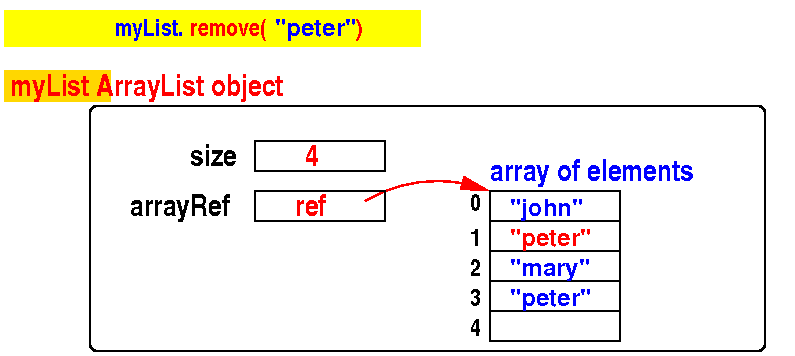
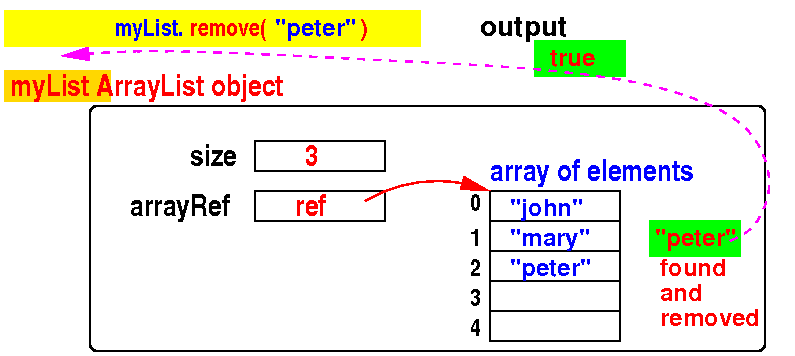
- remove( element )
removes the
first occurence of
element and
returns
true if
removal was
successful
and
returns
false
otherwise
Before
remove("peter"):
After
remove("peter"):
|
remove(
element
)
- Syntax of
remove(
element ):
- Example:
remove the
first occurence of
"peter"
    public static void main(String[] args)
    {
        ArrayList<String> myList = new ArrayList<>();

        myList.add("john");
	myList.add("peter"); // first occurence
        myList.add("mary");
	myList.add("peter");

        System.out.println( myList.remove("peter") ); // true
        System.out.println( myList ); // [john,mary,peter]
    }
|
|
DEMO:
demo/11-arrayList/04-update/Remove2.java
Using
remove(element)
to remove
all occurences in an ArrayList
(a frequent question in
AP CS exams)
Using
remove(element)
to remove
all occurences in an ArrayList
(a frequent question in
AP CS exams)
Using
remove(element)
to remove
all occurences in an ArrayList
(a frequent question in
AP CS exams)
DEMO:
demo/11-arrayList/04-update/Remove2All.java
Other useful methods in
ArrayList
- Obtaining
information
about an
ArrayList
object:
  size():
       Returns the number of elements in this ArrayList.

  isEmpty():
       Returns true if this ArrayList contains no elements.
       Otherwise return false
|
- Resetting an
ArrayList
object:
 clear():
       Removes all of the elements from this ArrayList.
|
|
(1)
Number of elements,
(2) check if an ArrayList is empty and
(3) clear an ArrayList
public class Info
{
    public static void main(String[] args)
    {
        ArrayList<String> myList = new ArrayList<>();

        System.out.println( myList.size() );    // 0
        System.out.println( myList.isEmpty() ); // true

        myList.add("john");
	myList.add("peter");
        myList.add("mary");
	myList.add("peter");

        System.out.println( myList.size() );    // 4
        System.out.println( myList.isEmpty() ); // false

	myList.clear();

        System.out.println( myList.size() );    // 0
        System.out.println( myList.isEmpty() ); // true
    }
}
|
DEMO:
demo/11-arrayList/04-update/Info.java
❮
❯