Defining a class
How to define a class that you can use to construct Circle objects:
public class Circle
{
    public double radius = 1;       /** The radius of this circle */

    public Circle() { }             /** Constructor 1 for a circle object */

    public Circle(double newRadius) /** Constructor 2 for a circle object */
    {
        radius = newRadius;
    }

    public double getArea()      /** Return the area of this circle */
    {
        return 3.14159 * radius * radius;
    }

    public void setRadius(double newRadius) /** Set new radius for this circle */
    {
       radius = newRadius;
    }
}
|
DEMO: demo/10-classes/01-class/Circle.java
Using the
Circle class
to construct some
circles
We can use the Circle class to create (= instantiate) 2 Circle objects as follows:
public static void main()
{
Circle circle1 = new Circle();
// Invokes Circle() to make this circle
Circle circle2 = new Circle(2);
// Invokes Circle(double) to make this circle
}
|
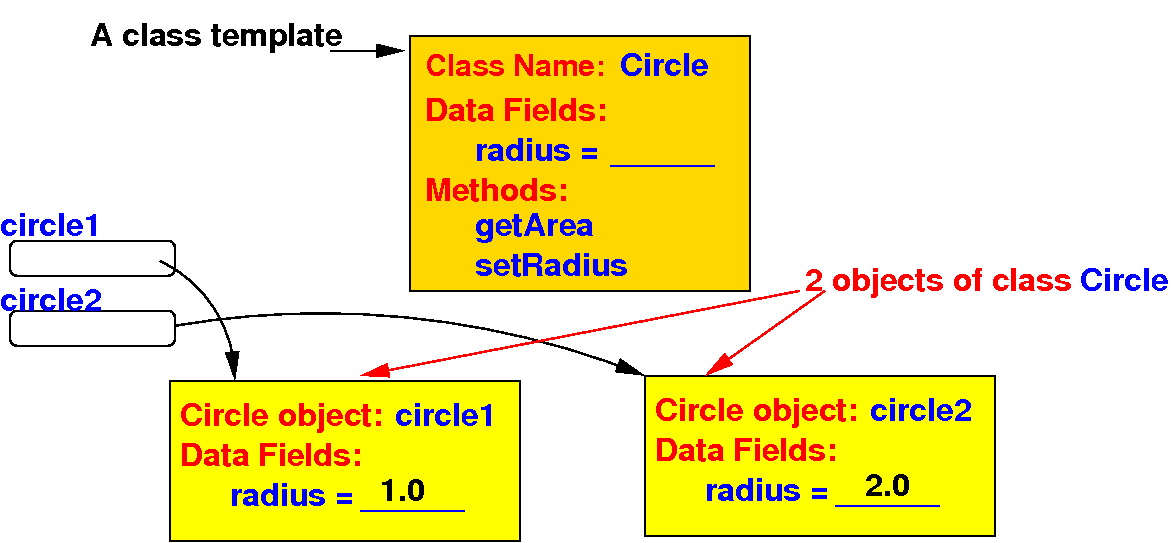
DEMO: demo/10-classes/01-class/Demo.java - show the objects in main(). Step into the constructors
How a class definition represents
objects
A Java class uses variables to define (= represent) data fields (properties) of objects:
public class Circle
{
    public double radius = 1;       /** The radius of this circle */

    public Circle()                 /** Constructor 1 for a circle object */
    {
    }

    public Circle(double newRadius) /** Constructor 2 for a circle object */
    {
        radius = newRadius;
    }

    public double getArea()      /** Return the area of this circle */
    {
        return 3.14159 * radius * radius;
    }

    public void setRadius(double newRadius) /** Set new radius for this circle */
    {
       radius = newRadius;
    }
}
|
Such a variable is called an instance variable
How a class definition represents
objects
A Java class uses methods to define the actions/behaviors of objects:
public class Circle
{
    public double radius = 1;       /** The radius of this circle */

    public Circle()                 /** Constructor 1 for a circle object */
    {
    }

    public Circle(double newRadius) /** Constructor 2 for a circle object */
    {
        radius = newRadius;
    }

    public double getArea()      /** Return the area of this circle */
    {
        return 3.14159 * radius * radius;
    }

    public void setRadius(double newRadius) /** Set new radius for this circle */
    {
       radius = newRadius;
    }
}
|
Such a method is called an instance method
How a class definition represents
objects
Important note: instance methods that define the actions of objects do not have the static qualifier
public class Circle
{
    public double radius = 1;       /** The radius of this circle */

    public Circle()                 /** Constructor 1 for a circle object */
    {
    }

    public Circle(double newRadius) /** Constructor 2 for a circle object */
    {
        radius = newRadius;
    }

    public double getArea()      /** Do NOT use static qualifier ! */
    {
        return 3.14159 * radius * radius;
    }

    public void setRadius(double newRadius) /** Do NOT use static qualifier ! */
    {
       radius = newRadius;
    }
}
|
Methods without the static qualifier will operate on an instance of an object (hence: "instance" methods)
Constructors
A class provides special methods called constructors which are invoked only to create a new object:
public class Circle
{
    public double radius = 1;       /** The radius of this circle */

    public Circle()                 /** Constructor 1 for a circle object */
    {
    }

    public Circle(double newRadius) /** Constructor 2 for a circle object */
    {
        radius = newRadius;
    }

    public double getArea()      /** Return the area of this circle */
    {
        return 3.14159 * radius * radius;
    }

    public void setRadius(double newRadius) /** Set new radius for this circle */
    {
       radius = newRadius;
    }
}
|
Constructors are designed to perform initializing actions, i.e.: initializing the data fields of the new object
The main( ) method
is optional
A class that represents real world objects usually does not need a main( ) method:
public class Circle
{
    public double radius = 1;       /** The radius of this circle */

    public Circle()                 // called when you use: new Circle()
    {
    }

    public Circle(double newRadius) // called when you use: new Circle(number)
    {
        radius = newRadius;
    }

    public double getArea()      /** Return the area of this circle */
    {
        return 3.14159 * radius * radius;
    }

    public void setRadius(double newRadius) /** Set new radius for this circle */
    {
       radius = newRadius;
    }
}
|
Without a main( ) method, such class cannot be run as a Java program
The main( ) method
is optional
You may put a main( ) method in the Circle class to test the methods:
public class Circle
{
    public double radius = 1;       /** The radius of this circle */

    public static void main(String[] args)
    {
        Circle circle1 = new Circle();
        Circle circle2 = new Circle(2);
    }

    public Circle() { }             // called when you use: new Circle()

    public Circle(double newRadius) // called when you use: new Circle(number)
    {
        radius = newRadius;
    }

    public double getArea()      /** Return the area of this circle */
    {
        return 3.14159 * radius * radius;
    }

    public void setRadius(double newRadius) /** Set new radius for this circle */
    {
       radius = newRadius;
    }
}
|
DEMO: demo/10-classes/02-with-main/Circle.java --- I prefer to write a separate class to do testing
How to
use the
instance variables and
instance methods in
an object
Example of (1) invoking methods and (2) accessing variables in objects:
    public static void main()
    {
        Circle circle1 = new Circle();  // Create a Circle object circle1
        Circle circle2 = new Circle(2); // Create a Circle object circle2

	double area1 = circle1.getArea(); // Tell circle1 to run getArea()
	System.out.println("Area of circle1 = " + area1);

	double area2 = circle2.getArea(); // Tell circle2 to run getArea()
	System.out.println("Area of circle2 = " + area2);


	circle1.setRadius(5);          // Tell circle1 to run setRadius()

	area1 = circle1.getArea();     // Tell circle1 to run getArea()
	System.out.println("Area of circle1 = " + area1);

	circle1.radius = 10;    // Update circle1's radius variable directly

	area1 = circle1.getArea();     // Tell circle1 to run getArea()
	System.out.println("Area of circle1 = " + area1);
    }
|
DEMO: demo/10-classes/03-invoke-method/Demo.java + Circle.java
What happens
inside the computer when you
create an
object
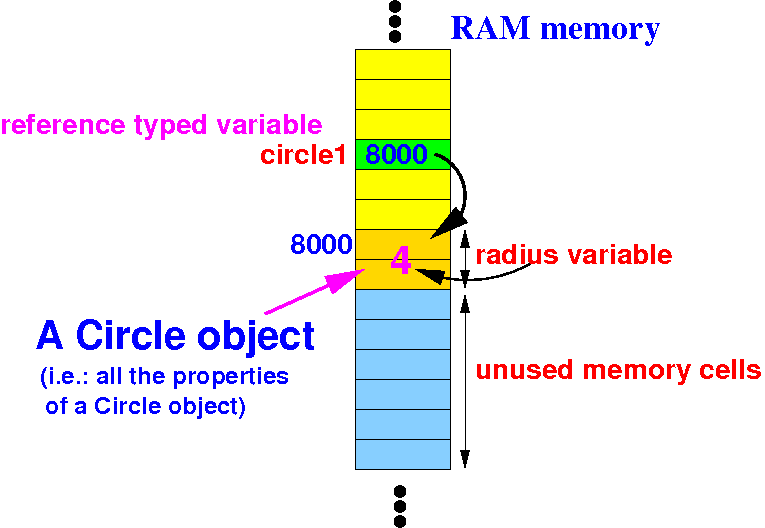
The following diagrams show what happens inside the computer system:
     Circle circle1;           // circle1 is a reference variable !
     circle1 = new Circle(4);
|
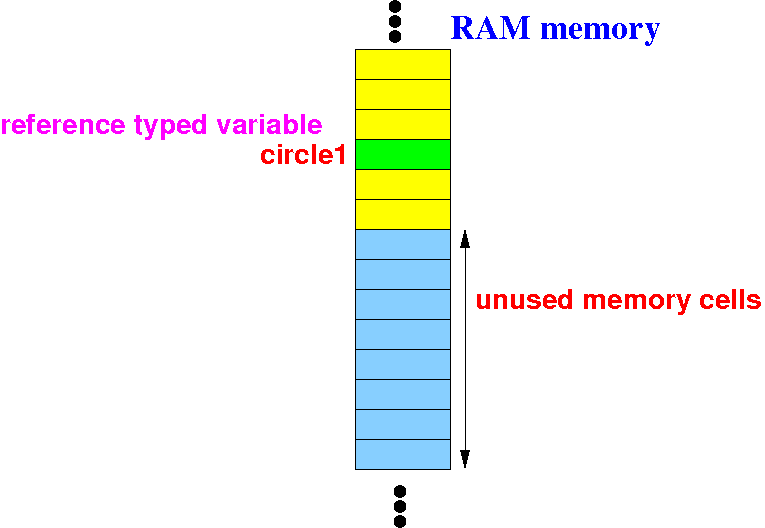
"Circle circle1" will allocate (reserve memory) a reference variable circle1:
What happens
inside the computer when you
create an
object
The following diagrams show what happens inside the computer system:
     Circle circle1;           // circle1 is a reference variable !
     circle1 = new Circle(4);
|
"new Circle(4)" will allocate (reserve memory) for an radius variable and return its base address:
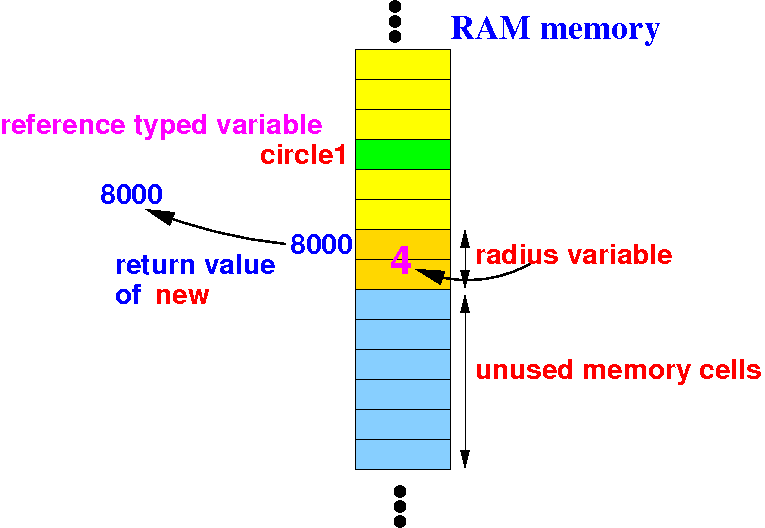
The radius variable will also be initialize with the value 4.
What happens
inside the computer when you
create an
object
The following diagrams show what happens inside the computer system:
     Circle circle1;           // circle1 is a reference variable !
     circle1 = new Circle(4);
|
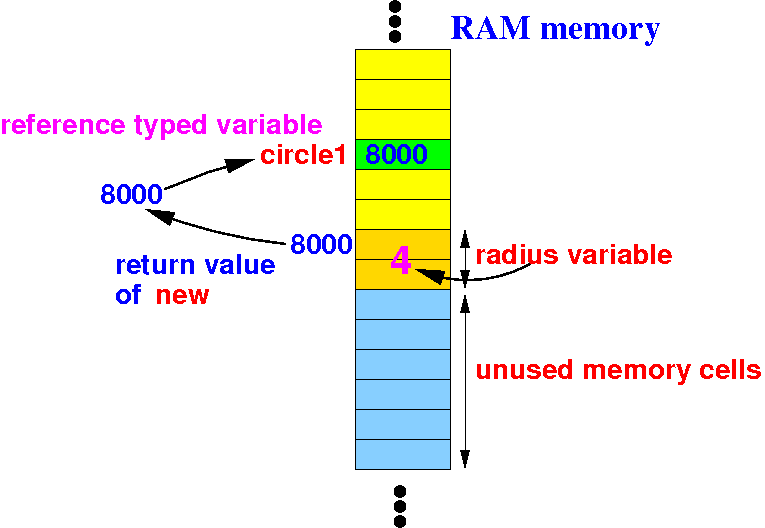
"circle1 = " will assign the return value to the variable circle1:
What happens
inside the computer when you
create an
object
Summary of the effect of:
     Circle circle1;           // circle1 is a reference variable !
     circle1 = new Circle(4);
|
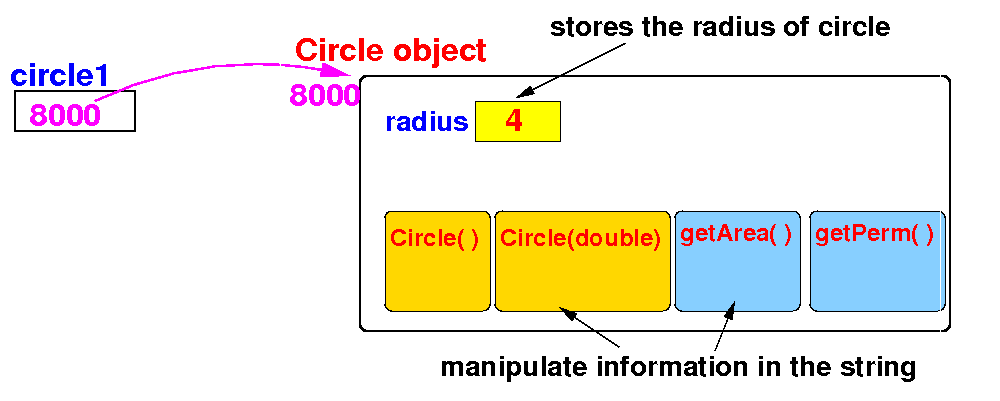
The reference variable circle1 will reference to a newly created Circle object:
What happens
inside the computer when you
create an
object
Summary of the effect of:
     Circle circle1;           // circle1 is a reference variable !
     circle1 = new Circle(4);
|
The reference variable circle1 will reference to a newly created Circle object:
Depicted abstractly without the computer memory
Applying what you have learned...
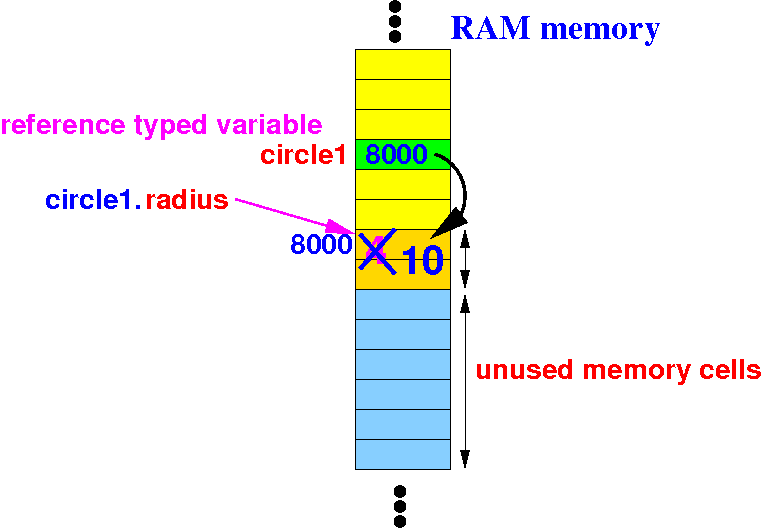
Previously, we used this expression to access the radius variable in the circle object Circle1:
circle1.radius = 10;
|
In this diagram, you can clearly see how Java uses the reference variable circle1 to access radius:
Preventing
undesirable behavior
in objects
Notice that: the Circle class allows a user to access the instance variable radius directly:
    public static void main()
    {
        Circle circle1 = new Circle();  // Create a Circle object circle1

	double area1 = circle1.getArea(); // Tell circle1 to run getArea()
	System.out.println("Area of circle1 = " + area1);

	circle1.radius = 10;   // We can update the radius variable directly

	area1 = circle1.getArea();     // Tell circle1 to run getArea()
	System.out.println("Area of circle1 = " + area1);
    }
|
Because: the access modifier for radius is public:
public class Circle
{
    public double radius = 1;  // The radius variable is accessible by other classes

    ....
|
Preventing
undesirable behavior
in objects
We can prevent direct access to variables in a class by using the private qualifier:
public class Circle
{
    private double radius = 1;  // Disallows direct access to radius
                                // from outside the class Circle
    ....
|
Attempt to directly access a private variable will result in a compile error:
    public static void main()
    {
        Circle circle1 = new Circle();  // Create a Circle object circle1

	double area1 = circle1.getArea(); // Tell circle1 to run getArea()
	System.out.println("Area of circle1 = " + area1);

	circle1.radius = 10;   // Compile error

	area1 = circle1.getArea();     // Tell circle1 to run getArea()
	System.out.println("Area of circle1 = " + area1);
    }
|
DEMO: demo/10-classes/04-private/Demo.java + Circle.java --- show compiler error