Searching Arrays
|
The
search problem
for an array
|
The linear search
algorithm for
arrays
The linear search
algorithm for
arrays
The linear search
algorithm for
arrays
The linear search
algorithm for
arrays
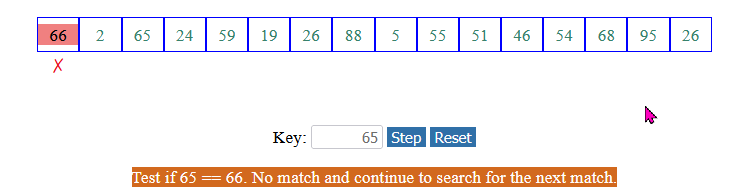
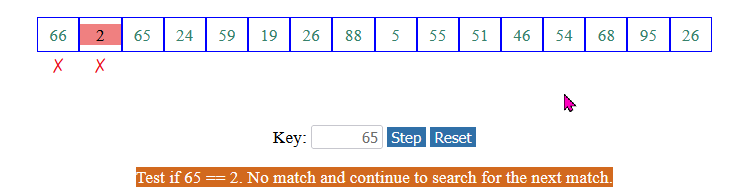
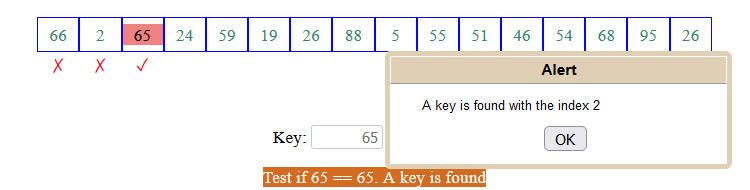
The linear search algorithm for arrays:
    /* ----------------------------------------------------
       The linear search algorithm to find key
       in the array list
       ---------------------------------------------------- */
    public static int linearSearch(int[] list, int key)
    {
        for ( int i = 0; i < list.length; i++ )
	   if ( list[i] == key )
	       return i;

        // key was not found in list[]
	return -1;
    }

    public static void main(String[] args)
    {
        int[] myList = {1, 4, 4, 2, 5, -3, 6, 2};

	int i = linearSearch(myList,  4); // Returns  1
	int j = linearSearch(myList, -4); // Returns -1
	int k = linearSearch(myList, -3); // Returns 5
    }
|
The linear search
algorithm for
arrays
Examine each array element sequentially:
    /* ----------------------------------------------------
       The linear search algorithm to find key
       in the array list
       ---------------------------------------------------- */
    public static int linearSearch(int[] list, int key)
    {
        for ( int i = 0; i < list.length; i++ )
	   Does list[i] contains key ?
	       return i;

        // key was not found in list[]
	return -1;
    }

    public static void main(String[] args)
    {
        int[] myList = {1, 4, 4, 2, 5, -3, 6, 2};

	int i = linearSearch(myList,  4); // Returns  1
	int j = linearSearch(myList, -4); // Returns -1
	int k = linearSearch(myList, -3); // Returns 5
    }
|
The linear search
algorithm for
arrays
Look for the key value in each array element:
    /* ----------------------------------------------------
       The linear search algorithm to find key
       in the array list
       ---------------------------------------------------- */
    public static int linearSearch(int[] list, int key)
    {
        for ( int i = 0; i < list.length; i++ )
	   if ( list[i] == key )
	       return i;

        // key was not found in list[]
	return -1;
    }

    public static void main(String[] args)
    {
        int[] myList = {1, 4, 4, 2, 5, -3, 6, 2};

	int i = linearSearch(myList,  4); // Returns  1
	int j = linearSearch(myList, -4); // Returns -1
	int k = linearSearch(myList, -3); // Returns 5
    }
|
The linear search
algorithm for
arrays
If the key is found in list[i], we return the index i:
    /* ----------------------------------------------------
       The linear search algorithm to find key
       in the array list
       ---------------------------------------------------- */
    public static int linearSearch(int[] list, int key)
    {
        for ( int i = 0; i < list.length; i++ )
	   if ( list[i] == key )
	       return i;

        // key was not found in list[]
	return -1;
    }

    public static void main(String[] args)
    {
        int[] myList = {1, 4, 4, 2, 5, -3, 6, 2};

	int i = linearSearch(myList,  4); // Returns  1
	int j = linearSearch(myList, -4); // Returns -1
	int k = linearSearch(myList, -3); // Returns 5
    }
|
The linear search
algorithm for
arrays
When all elements have been searched, then we know that the key is not found in the array ==> return -1.
    /* ----------------------------------------------------
       The linear search algorithm to find key
       in the array list
       ---------------------------------------------------- */
    public static int linearSearch(int[] list, int key)
    {
        for ( int i = 0; i < list.length; i++ )
	   if ( list[i] == key )
	       return i;

        // key was not found in list[]
	return -1;
    }

    public static void main(String[] args)
    {
        int[] myList = {1, 4, 4, 2, 5, -3, 6, 2};

	int i = linearSearch(myList,  4); // Returns  1
	int j = linearSearch(myList, -4); // Returns -1
	int k = linearSearch(myList, -3); // Returns 5
    }
|
DEMO: demo/08-array/11-searching/LinearSearch.java
The binary search
algorithm for
arrays
|
The binary search
algorithm for
arrays
The binary search
algorithm for
arrays
The
binary search algorithm
for
arrays
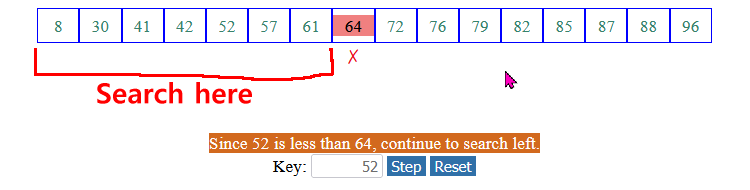
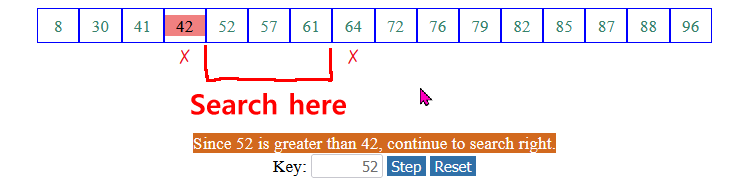
The binary search algorithm for arrays starts with low and high being equal to the end points of the array:
             +---+---+---+---+---+---+---+---+---+---+---+---+---+
    list[]:  |   |   |   |   |   |   |   |   |   |   |   |   |   |
             +---+---+---+---+---+---+---+---+---+---+---+---+---+
               ^                                               ^
	       |					       |
	      low					      high

    public static int binarySearch(int[] list, int key)
    {
        int low  = 0;
	int high = list.length - 1;

	while (low <= high)
	{
	    int mid = (low + high) / 2;

	    if (key == list[mid])
	        return mid;
	    else if (key < list[mid])
	        high = mid - 1;
	    else
	       low = mid + 1;
        }

        return -1; // Not found
    }
|
The
binary search algorithm
for
arrays
(1) Find the middle element
             +---+---+---+---+---+---+---+---+---+---+---+---+---+
    list[]:  |   |   |   |   |   |   |   |   |   |   |   |   |   |
             +---+---+---+---+---+---+---+---+---+---+---+---+---+
               ^                       ^                       ^
	       |		       |		       |
	      low		      mid		      high

    public static int binarySearch(int[] list, int key)
    {
        int low  = 0;
	int high = list.length - 1;

	while (low <= high)
	{
	    int mid = (low + high) / 2;

	    if (key == list[mid])
	        return mid;
	    else if (key < list[mid])
	        high = mid - 1;
	    else
	       low = mid + 1;
        }

        return -1; // Not found
    }
|
The
binary search algorithm
for
arrays
(2) If key == list[mid], we found the search value key:
             +---+---+---+---+---+---+---+---+---+---+---+---+---+
    list[]:  |   |   |   |   |   |   |key|   |   |   |   |   |   |
             +---+---+---+---+---+---+---+---+---+---+---+---+---+
               ^                       ^                       ^
	       |		       |		       |
	      low		      mid		      high

    public static int binarySearch(int[] list, int key)
    {
        int low  = 0;
	int high = list.length - 1;

	while (low <= high)
	{
	    int mid = (low + high) / 2;

	    if (key == list[mid])
	        return mid;
	    else if (list[mid] > key)
	        high = mid - 1;
	    else
	       low = mid + 1;
        }

        return -1; // Not found
    }
|
The
binary search algorithm
for
arrays
(3) If key < list[mid], we continue the search in the lower half of the array:
+---+---+---+---+---+---+---+---+---+---+---+---+---+
list[]: | | | | | | | < | | | | | | |
+---+---+---+---+---+---+---+---+---+---+---+---+---+
^ ^ ^
| | |
low <- new range-> high mid
|
The
binary search algorithm
for
arrays
(4) Otherwise ( key > list[mid]), we continue the search in the upper half of the array:
+---+---+---+---+---+---+---+---+---+---+---+---+---+
list[]: | | | | | | | > | | | | | | |
+---+---+---+---+---+---+---+---+---+---+---+---+---+
^ ^ ^
| | |
|
The
binary search algorithm
for
arrays
(5) We must repeat the steps for the remaining array elements: When do we stop ?
+---+---+---+---+---+---+---+---+---+---+---+---+---+
list[]: | | | | | | | | | | | | | |
+---+---+---+---+---+---+---+---+---+---+---+---+---+
^ ^
| |
|
The
binary search algorithm
for
arrays
(6) We stop when low > high. In other words: we continue as long as low <= high:
             +---+---+---+---+---+---+---+---+---+---+---+---+---+
    list[]:  |   |   |   |   |   |   |   |   |   |   |   |   |   |
             +---+---+---+---+---+---+---+---+---+---+---+---+---+
                                       ^   ^
	        		       |   |	<--- empty array
	         		     high low

    public static int binarySearch(int[] list, int key)
    {
        int low  = 0;
	int high = list.length - 1;

	while ( low <= high )
	{
	    int mid = (low + high) / 2;

	    if (key == list[mid])
	        return mid;
	    else if (key < list[mid])
	        high = mid - 1;
	    else
	        low = mid + 1;
        }

        return -1; // Not found
    }
|
The
binary search algorithm
for
arrays
(7) we return -1 when key is not found:
             +---+---+---+---+---+---+---+---+---+---+---+---+---+
    list[]:  |   |   |   |   |   |   |   |   |   |   |   |   |   |
             +---+---+---+---+---+---+---+---+---+---+---+---+---+
                                       ^   ^
	        		       |   |	<--- empty array
	         		     high low

    public static int binarySearch(int[] list, int key)
    {
        int low  = 0;
	int high = list.length - 1;

	while ( low <= high )
	{
	    int mid = (low + high) / 2;

	    if (key == list[mid])
	        return mid;
	    else if (key < list[mid])
	        high = mid - 1;
	    else
	        low = mid + 1;
        }

        return -1; // Not found
    }
|
The
binary search algorithm
for
arrays
Demo program
    public static void main(String[] args)
    {
        int[] myList = {1, 5, 9, 17, 19, 78, 99, 143, 450, 876, 999};
        int r;

        r = binarySearch(myList, 143);
        System.out.println("r = " + r);
    }

    public static int binarySearch(int[] list, int key)
    {
        int low  = 0;
	int high = list.length - 1;

	while ( low <= high )
	{
	    int mid = (low + high) / 2;

	    if (key == list[mid])
	        return mid;
	    else if (key < list[mid])
	        high = mid - 1;
	    else
	        low = mid + 1;
        }

        return -1; // Not found
    }
|
DEMO: demo/08-array/11-searching/BinarySearch.java
The
binary search algorithm
for
arrays of
strings
The binary search algorithm can be adapted to work with arrays of Strings as follows:
String[] String
public static int binarySearch(
|
Hint: let the Java compiler help you find the necessary changes in the program !
The
binary search algorithm
for
arrays of
strings
The binary search algorithm for String must use compareTo( ) to compare String values:
    public static int binarySearch(String[] list, String key)
    {
        int low  = 0;
	int high = list.length - 1;

	while ( low <= high )
	{
	    int mid = (low + high) / 2;

	    if (key.compareTo(list[mid]) == 0)
	        return mid;
	    else if (key.compareTo(list[mid]) < 0)
	        high = mid - 1;
	    else
	        low = mid + 1;
        }

        return -1; // Not found
    }
|
Next slide has the demo program....
The
binary search algorithm
for
arrays of
strings
- demo program
    public static void main(String[] args)
    {
        String[] myList = {"abe", "becky", "clair", "henry", "norm", "sam"};
        int r;

        r = binarySearch(myList, "sam");
        System.out.println("r = " + r);
    }

    public static int binarySearch(String[] list, String key)
    {
        int low  = 0;
	int high = list.length - 1;

	while ( low <= high )
	{
	    int mid = (low + high) / 2;

	    if (key.compareTo(list[mid]) == 0)
	        return mid;
	    else if (key.compareTo(list[mid]) < 0)
	        high = mid - 1;
	    else
	        low = mid + 1;
        }

        return -1; // Not found
    }
|
DEMO: demo/08-array/11-searching/StringBinarySearch.java