Processing data stored in arrays    -    background information

  • The computer hardware only provides instructions that process primitive data types:

        byte   short/char    int    long    float    double    boolean 
    

  • Data stored in arrays must be processed one array element at a time:

    • We must use a loop-statement to iterate over all the elements in an array to process the data stored in an array

  • Recall that:

     arrayVarName.length = the length (= # elements) in the array

  • The typical program code to process data stored in an array arrayVarName is like this:

     for ( int i = 0; i  <  arrayVarName.length; i++ )
         "process data stored in arrayVarName[i]"

Processing arrays 1:    initialization and printing

  • Exercise:

    • Write code that define an array myList of 10 double variables and initialize myList[i] with i*i

    • Print the array out.

    Answer:

       public static void main(String[] args)
       {
           double[] myList = new double[10];
    
            for ( int i = 0; i < myList.length; i++ )
                myList[i] = i*i;
                
            for ( int i = 0; i < myList.length; i++ )
                System.out.println("myList[" + i + "] = " + myList[i]);
       }


Processing arrays 1:    initialization and printing

  • Exercise:

    • Write code that define an array myList of 10 double variables and initialize myList[i] with i*i

    • Print the array out.

    Answer:   first create an array of size 10

       public static void main(String[] args)
       {
           double[] myList = new double[10];


       }

Processing arrays 1:    initialization and printing

  • Exercise:

    • Write code that define an array myList of 10 double variables and initialize myList[i] with i*i

    • Print the array out.

    Answer:   run index i over all indexes in the array:

       public static void main(String[] args)
       {
           double[] myList = new double[10];
    
           for ( int i = 0; i < myList.length; i++ )


       }

Processing arrays 1:    initialization and printing

  • Exercise:

    • Write code that define an array myList of 10 double variables and initialize myList[i] with i*i

    • Print the array out.

    Answer:   initialize myList[i] with the value i*i

       public static void main(String[] args)
       {
           double[] myList = new double[10];
    
           for ( int i = 0; i < myList.length; i++ )
               myList[i] = i*i;


       }

Processing arrays 1:    initialization and printing

  • Exercise:

    • Write code that define an array myList of 10 double variables and initialize myList[i] with i*i

    • Print the array out.

    Answer:   use a similar loop to print myList[i]

       public static void main(String[] args)
       {
           double[] myList = new double[10];
    
           for ( int i = 0; i < myList.length; i++ )
               myList[i] = i*i;
                
           for ( int i = 0; i < myList.length; i++ )
               System.out.println("myList[" + i + "] = " + myList[i]);
       }

DEMO: demo/08-array/03-array-processing/PrintArray.java

Processing arrays 2:    sum all elements in an array

  • Exercise:

    • Write program code that compute the sum of all elements stored in the array myList

    Finish the program below:

       public static void main(String[] args)
       {
           double[] myList = { 1, 2, 3, 4, 5, 6};
           double   sum;
    
           // Compute sum = sum all elements in array myList
    
           sum = 0;
           for ( int i = 0; i < myList.length; i++ )
               sum = sum + myList[i];
                
           System.out.println("sum = " + sum);
       }


Processing arrays 2:    sum all elements in an array

  • Exercise:

    • Write program code that compute the sum of all elements stored in the array myList

    Initialize the sum to  0  (= no value has been added yet):

       public static void main(String[] args)
       {
           double[] myList = { 1, 2, 3, 4, 5, 6};
           double   sum;
    
           // Compute sum = sum all elements in array myList
    
           sum = 0;
           for ( int i = 0; i < myList.length; i++ )
               sum = sum + myList[i];
                
           System.out.println("sum = " + sum);
       }


Processing arrays 2:    sum all elements in an array

  • Exercise:

    • Write program code that compute the sum of all elements stored in the array myList

    Use the index i to run through all the elements in myList array:

       public static void main(String[] args)
       {
           double[] myList = { 1, 2, 3, 4, 5, 6};
           double   sum;
    
           // Compute sum = sum all elements in array myList
    
           sum = 0;
           for ( int i = 0; i < myList.length; i++ )
              
                
           System.out.println("sum = " + sum);
       }


Processing arrays 2:    sum all elements in an array

  • Exercise:

    • Write program code that compute the sum of all elements stored in the array myList

    Add each array element myList[i] to the variable sum one at a time:

       public static void main(String[] args)
       {
           double[] myList = { 1, 2, 3, 4, 5, 6};
           double   sum;
    
           // Compute sum = sum all elements in array myList
    
           sum = 0;
           for ( int i = 0; i < myList.length; i++ )
               sum = sum + myList[i];
                
           System.out.println("sum = " + sum);
       }

DEMO: demo/08-array/03-array-processing/SumArray.java

Processing arrays 3:    find the largest value and its index in an array

  • Exercise:

    • Write program code that find (1) the value and (2) the index of the largest value of all elements stored in the array myList:

    Finish the program below:

       public static void main(String[] args)
       {
           double[] myList = { 1, 4, 9, 3, 7, 5, 6};
           double max;        // larget value found in array 
           int    indexOfMax; // index where the largest value is found
    
           // Find max value and its index
           max = myList[0];
           indexOfMax = 0;
           for ( int i = 1; i < myList.length; i++ )
               if ( myList[i] > max )
               {
                   max = myList[i];
                   indexOfMax = i;
               }
       }


Processing arrays 3:    find the largest value and its index in an array

  • Exercise:

    • Write program code that find (1) the value and (2) the index of the largest value of all elements stored in the array myList:

    Initialize the max variable:   assume the 1st value in array has the largest value

       public static void main(String[] args)
       {
           double[] myList = { 1, 4, 9, 3, 7, 5, 6};
           double max;        // larget value found in array 
           int    indexOfMax; // index where the largest value is found
    
           // Find max value and its index
           max = myList[0];  // Assume the 1st element is the largest
           indexOfMax = 0;   // Location of the largest value 
           for ( int i = 1; i < myList.length; i++ )
               if ( myList[i] > max )
               {
                   max = myList[i];
                   indexOfMax = i;
               }
       }


Processing arrays 3:    find the largest value and its index in an array

  • Exercise:

    • Write program code that find (1) the value and (2) the index of the largest value of all elements stored in the array myList:

    Use the index i to run through the rest of the elements in myList array:

       public static void main(String[] args)
       {
           double[] myList = { 1, 4, 9, 3, 7, 5, 6};
           double max;        // larget value found in array 
           int    indexOfMax; // index where the largest value is found
    
           // Find max value and its index
           max = myList[0];  // Assume the 1st element is the largest
           indexOfMax = 0;   // Location of the largest value 
           for ( int i =  1 ; i < myList.length; i++ )


       }


Processing arrays 3:    find the largest value and its index in an array

  • Exercise:

    • Write program code that find (1) the value and (2) the index of the largest value of all elements stored in the array myList:

    Check for a "better" max:   if myList[i] > max, we have found a better maximum

       public static void main(String[] args)
       {
           double[] myList = { 1, 4, 9, 3, 7, 5, 6};
           double max;        // larget value found in array 
           int    indexOfMax; // index where the largest value is found
    
           // Find max value and its index
           max = myList[0];  // Assume the 1st element is the largest
           indexOfMax = 0;   // Location of the largest value 
           for ( int i =  1 ; i < myList.length; i++ )
               if ( myList[i] > max ) // Check if myList[i] is "better"
               {
                   max = myList[i]; // Found a larger value
                   indexOfMax = i;  // Remember its location
               }
       }

DEMO: demo/08-array/03-array-processing/SumArray.java

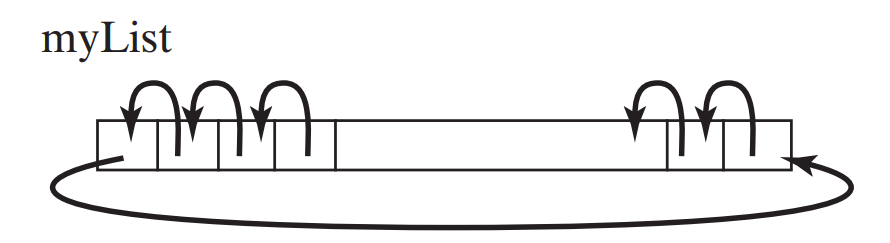
Processing arrays 4:    shift the elements in an array one place to the left

  • Write code that shift the array elements as follows:

    Finish the program below:

        public static void main(String[] args)
        {
            double[] myList = { 1, 4, 9, 3, 7, 5, 6};
    
            // Shift array one position to left
            
            double temp = myList[0];
           
            for ( int i = 1; i < myList.length; i++ )
               myList[i-1] = myList[i];
    
            myList[myList.length-1] = temp;
        }


Processing arrays 4:    shift the elements in an array one place to the left

  • Write code that shift the array elements as follows:

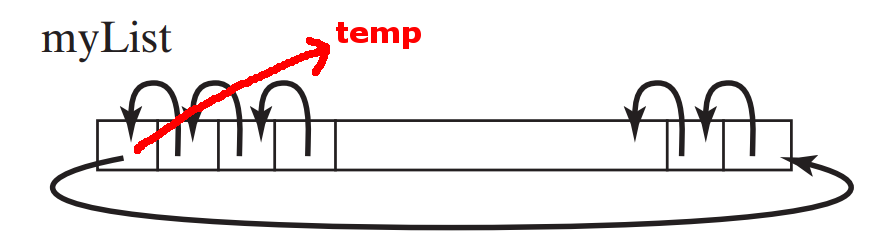
    Save the value in myList[0] in temp:

        public static void main(String[] args)
        {
            double[] myList = { 1, 4, 9, 3, 7, 5, 6};
    
            // Shift array one position to left
           
            double temp = myList[0]; // Save myList[0] in temp 
           
            for ( int i = 1; i < myList.length; i++ )
               myList[i-1] = myList[i];
    
            myList[myList.length-1] = temp;
        }


Processing arrays 4:    shift the elements in an array one place to the left

  • Write code that shift the array elements as follows:

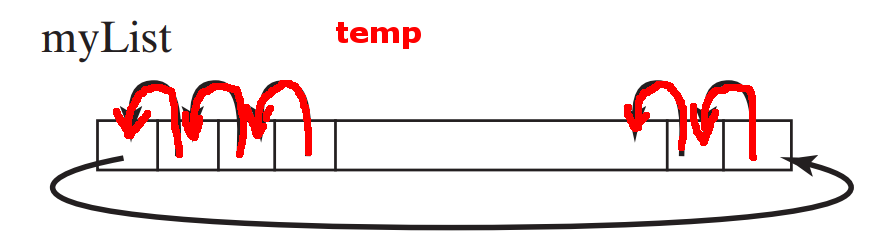
    Move array elements myList[1], myList[2], .... 1 position to the left:

        public static void main(String[] args)
        {
            double[] myList = { 1, 4, 9, 3, 7, 5, 6};
    
            // Shift array one position to left
           
            double temp = myList[0]; // Save myList[0] in temp
           
            for ( int i = 1; i < myList.length; i++ )
               myList[i-1] = myList[i];
     
            myList[myList.length-1] = temp;
        }


Processing arrays 4:    shift the elements in an array one place to the left

  • Write code that shift the array elements as follows:

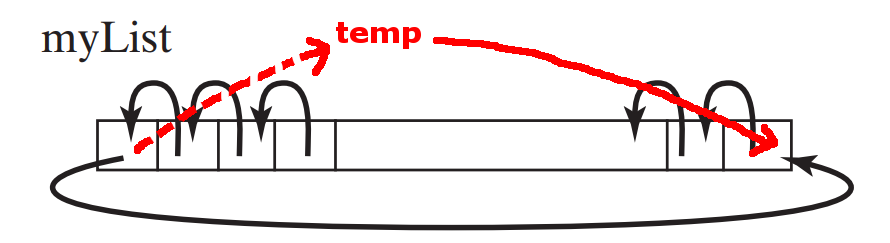
    Put the array element myList[0] in the last array position:

        public static void main(String[] args)
        {
            double[] myList = { 1, 4, 9, 3, 7, 5, 6};
    
            // Shift array one position to left
           
            double temp = myList[0]; // Save myList[0] in temp
           
            for ( int i = 1; i < myList.length; i++ )
               myList[i-1] = myList[i];
    
            myList[myList.length-1] = temp; // temp contains myList[0]
        }

DEMO: demo/08-array/03-array-processing/ShiftArray.java

Processing arrays 5:    random shuffle

  • In many computer applications, you need to randomly re-order the elements in an array.

      • This operation is called shuffling.

  • Example:

      • We will soon use an array to represent a deck of playing cards

      • The shuffle operation will simulate the shuffling of a deck of cards


  • How to randomly re-order elements in an array:   for every index i of an array do:

      1. randomly generate an index j between 0 and myList.length-1

      2. swap myList[i] with myList[j], as follows:



Processing arrays 5:    random shuffle

  • Write code that perform a random shuffle on the elements in array myList:

        public static void main(String[] args)
        {
            double[] myList = { 1, 4, 9, 3, 7, 5, 6};
    
            // Random suffle on array myList
            for ( int i = 0; i < myList.length; ++ )
            {
                int j = (int)(Math.random() * myList.length);
                
                // swap myList[i] and myList[j]
                double temp = myList[i];
                myList[i] = myList[j];
                myList[j] = temp;
            }
            
            for ( int i = 0; i < myList.length; i++ )
                System.out.print(myList[i] + "  ");
        }


Processing arrays 5:    random shuffle

  • Perform the random swap operation for each element in the array:

        public static void main(String[] args)
        {
            double[] myList = { 1, 4, 9, 3, 7, 5, 6};
    
            // Random suffle on array myList
            for ( int i = 0; i < myList.length; i++ )
            {
                int j = (int)(Math.random() * myList.length);
                
                // swap myList[i] and myList[j]
                double temp = myList[i];
                myList[i] = myList[j];
                myList[j] = temp;
            }
            
            for ( int i = 0; i < myList.length; i++ )
                System.out.print(myList[i] + "  ");
        }


Processing arrays 5:    random shuffle

  • Pick a random integer from range [0 .. myList.length]

        public static void main(String[] args)
        {
            double[] myList = { 1, 4, 9, 3, 7, 5, 6};
    
            // Random suffle on array myList
            for ( int i = 0; i < myList.length; i++ )
            {
                int j = (int)(Math.random() * myList.length);
                
                // swap myList[i] and myList[j]
                double temp = myList[i];
                myList[i] = myList[j];
                myList[j] = temp;
            }
            
            for ( int i = 0; i < myList.length; i++ )
                System.out.print(myList[i] + "  ");
        }


Processing arrays 5:    random shuffle

  • Swap the elements myList[i] with the randomly selected myList[j]:

        public static void main(String[] args)
        {
            double[] myList = { 1, 4, 9, 3, 7, 5, 6};
    
            // Random suffle on array myList
            for ( int i = 0; i < myList.length; i++ )
            {
                int j = (int)(Math.random() * myList.length);
              
                // swap myList[i] and myList[j]
                double temp = myList[i];
                myList[i] = myList[j];
                myList[j] = temp;
            }
            
            for ( int i = 0; i < myList.length; i++ )
                System.out.print(myList[i] + "  ");
        }

DEMO: demo/08-array/03-array-processing/RandomShuffle.java

Use array to organize information    array used as an information lookup structure

  • Previously, we wrote a method getMonthName(month) that translate a month number to a month name:

      public static String getMonthName(int month) 
      { 
        String monthName = "";
    
        switch (month) 
        {
           case 1: monthName = "January";    break;
           case 2: monthName = "February";	 break;
           case 3: monthName = "March";	 break;
           case 4: monthName = "April";	 break;
           case 5: monthName = "May";	 break;
           case 6: monthName = "June";	 break;
           case 7: monthName = "July";	 break;
           case 8: monthName = "August";	 break;
           case 9: monthName = "September";	 break;
           case 10: monthName = "October";	 break;
           case 11: monthName = "November";	 break;
           case 12: monthName = "December";	 break;
        }
    
        return monthName;
      } 

DEMO: demo/08-array/03-array-processing/ArrayInfoStruct.java

Use array to organize information    array used as an information lookup structure

  • If we store the month names in an array as follows:

        public static String getMonthName(int month) 
        { 
            String[] months = {"January", "February", "March", 
    	                   "April", "May", "June", 
    			   "July", "August", "September", 
    			   "October", "Novenber", "December"};
    
            // Notice that:  month[0] = "January" 
                             month[1] = "February"
                             and so on            
        } 

Use array to organize information    array used as an information lookup structure

  • We can write the method getMonthName(month) as a simple lookup in the months array:

        public static String getMonthName(int month) 
        { 
            String[] months = {"January", "February", "March", 
    	                   "April", "May", "June", 
    			   "July", "August", "September", 
    			   "October", "Novenber", "December"};
    
            return months[month−1];
                          // We do not need to use a switch statement
    		      // This is much faster
        } 

DEMO: demo/08-array/03-array-processing/ArrayInfoStruct.java