A commonly used
problem solving
technique
- A
commonly used
programming technique to
solve
problems is:
Start with some initial (incorrect) solution
as long as ( solution is not correct )
{
improve the solution
}
|
- Example: make a tasty
lemonade:
Start with lemonade with no sugar added
as long as (lemonade is not tasty enough)
{
add 1 teaspoon of sugar // ≡ improve the solution
taste lemonade
}
|
- The
while-loop
helps you
construct this
problem solving
technique in
Java
|
The
while loop
-
Syntax of the
while-statement in
Java:
while ( loop-contuation-condition )
one-statement; // Loop body
or:
while ( loop-contuation-condition )
{
statement1; // Loop body
statement2;
...
}
|
-
Effect of the
while-statement:
- Check the
loop-contuation-condition
- If
true:
execute the
loop body and
repeat
If
false:
end the
loop and
continue with the
next statement in the
program
|
|
The
while loop
--
Example
- Example of the
while-statement in
Java:
int i;
i = 0;
while ( i < 4 )
{ // Loop body
System.out.println("Hello World");
i++;
}
|
- Effect of this
while-statement:
- As long as
i < 4 is
true, the
statements in the
loop body will be
executed (repeatedly)
|
Result:
- The loop body is
executed when
i = 0,1,2,3
but
when i=4, the loop
exits
|
|
DEMO:
demo/05-loops/01-intro/While.java
(DEMO
in BlueJ)
The
while loop
Flow chart
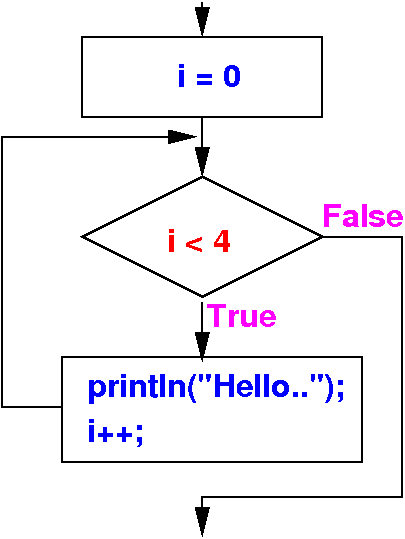
i = 0;
while ( i < 4 )
{ // Loop body
System.out.println("Hello World");
i++;
}
|
- The
flow chart of this
while-statement is:
|
Exercise
Write a program that
computes the
sum of
1 + 2 + 3 + 4 + 5 + 6 + 7 + 8 + 9 + 10
Program to compute 1 + 2 + 3 + 4 + 5 + 6 + 7 + 8 + 9 + 10
Variables:
We need to store these information:
(1) the sum
(2) the current number to add to sum
Algorithm:
sum = 0 // Set initial value when no number has been added
current number = 1 // First number to add to sum
as long as ( current number <= 10 )
{
add current number to sum
increase the current number to the next number
}
|
Write program in
BlueJ
Exercise
Write a program that
computes the
sum of
1 + 2 + 3 + 4 + 5 + 6 + 7 + 8 + 9 + 10
public class Summation
{
public static void main(String[] args)
{
int currNum, sum;
sum = 0;
currNum = 1; // Important: we must give currNum the correct initial value !
while ( currNum <= 10 ) // All numbers from 1 to 10
{
sum = sum + currNum;
currNum++;
}
System.out.println("Sum = " + sum);
}
}
|
DEMO:
demo/05-loops/02-while/Summation.java
Trace execution in
BlueJ
A common error
that results in a
infinite loop
If you
forget the
braces, you will
create an
infinitely loop:
public class Summation
{
public static void main(String[] args)
{
int currNum, sum;
sum = 0;
currNum = 1;
while ( currNum <= 10 )
// Forgot braces !
sum = sum + currNum;
currNum++; // Not executed inside loop !!
System.out.println("Sum = " + sum);
}
}
|
DEMO in
BlueJ
Programming exercise
- Write a
number guessing
game in
Java:
- Write a program that
randomly generates an
integer
between
0 and
100,
inclusive.
- The program then
prompts the user
to enter a number
continuously until the
number
entered is
equal to
the
randomly generated number.
-
For
each user input,
the program tells the user
whether the input is
too low
or too high,
so the user
can make the next guess intelligently.
|
|
Exercise
- Start with a plan:
(use a mix of
English and
Java to write the plan)
int x = generate a random integer between [0..100]
while ( user's guses is not equal to x )
{
guess = read next number from keyboard
if ( guess < x )
print "too low"
else if ( guess > x )
print "too high"
else
print "correct"
}
|
|
Exercise
- You cannot
use the
variable
guess
without
initializing it
first:
Scanner input = new Scanner(System.in);
int x = (int) (101*Math.random());
int guess = -1; // Need to start with an incorrect guess...
while ( guess != x )
{
guess = input.nextInt();
if ( guess < x )
System.out.println("too low");
else if ( guess > x )
System.out.println("too high");
else
System.out.println("correct");
}
|
Run program
in BlueJ
|
DEMO:
demo/05-loops/02-while/GuessNumber.java
(You can step through
to program)
Controlling a while
loop using a
sentinel
Controlling a while
loop using a
sentinel
- Start with a plan:
(use a mix of
English and
Java to write the plan)
int sum = 0;
int x;
while ( x != SENTINEL )
{
print "Enter an integer (the input ends if it is 0): "
x = read next number
if ( x != SENTINEL )
Add x to sum;
}
print sum;
|
|
Controlling a while
loop using a
sentinel
Controlling a while
loop using a
sentinel
DEMO:
demo/05-loops/02-while/ReadAndSum.java
❮
❯