Java String class


  • A string is a sequence of characters

  • String is a class in the Java library that represents strings

  • We will discuss:

      • How to define (create) classes in Chapter 9

  • In this chapter, we discuss how to use the Java String class

Defining and using String typed variables


  • Syntax to define a String typed variable:

     String message = "Hello";
    
     String text;
    
     text = "Welcome to Java";
      

  • The String data type is not a primitive data type

  • String is known as a reference data type

    Let's study what reference data types are next

Reference data types and objects

  • Reference data type:

      • All Java classes are reference data types

        I.e.: we can define variables by using a class name as data type

    Note:   we have not yet learn how to creat classes used to define variables yet !

  • Reference variables:

      • Variables defined with a reference data type is known as a reference variable.

      • Reference variable can reference objects of the corresponding data type

Reference data types and objects    Illustrated
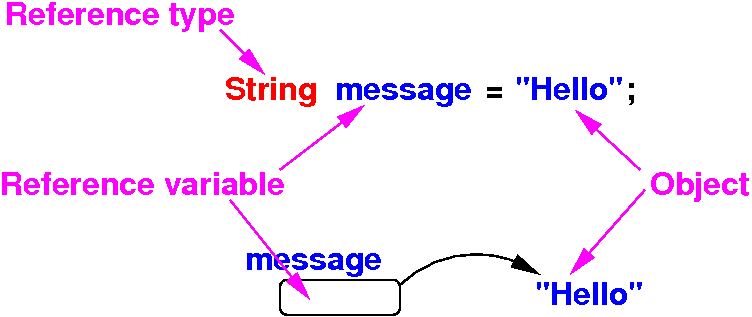


 String    is  a reference data type

 message   is a reference variable

 "Hello"   is a (String typed) object

 message   references (points to) the "Hello" object
  

How to use String variables


  • Reference data types (= classes) will be discussed later in detail in Chapter 9 ("Objects and Classes").

  • For the time being, you need to know only:

      • how to define a String variable
      • how to assign a string to the variable, and
      • how to use the methods in the String class

How to use String variables

  • Reference data types (= classes) can define methods that can be used to operate on the objects

  • Sample methods defined inside the String class:

       Method      Description
       ---------------------------------------------------------------
       length()       Returns the number of characters in this string
      
       charAt(index)  Returns the character at the specified index 
                      from this string
      
       concat(s1)     Returns a new string that concatenates this string 
                      with string s1
      
       toUpperCase()  Returns a new string with all letters in uppercase
      
       toLowerCase()  Returns a new string with all letters in lowercase
      
       trim()         Returns a new string with whitespace characters trimmed
                      on both sides

How to use String variables   Example

Example program showing how to use the methods in the String class:

public class MyProg 
{
   public static void main(String[] args) 
   {
     String s1 = "Hello";  // s1 is reference variable
     
     int len = s1.length();  // Return the length of s1
     char c = s1.charAt(0);  // "Hello"
     c = s1.charAt(1);       //  01234
     
     s1 = s1.concat("Abc");
     s1 = s1 + "Xyz";         // + ALSO concatenates !
     
     s1 = s1.toUpperCase();
     s1 = s1.toLowerCase();
     
     String s2 = "     ABC     ";
     s1 = s2.trim();
   }
} 

Java's methods    instance and static methods


  • There are 2 kinds of methods in Java:

      1. Instance methods:

           String s1;         // s1 references to an object
        
           s1.toUpperCase();  // Instance methods works on an object

      2. Static methods:

           Math.pow(5,2);  // Static methods do not works on objects
           ^^^^
           Class name

Objects and instance methods


  • Strings are objects in Java

  • Methods that are invoked (used) on objects are called:

      • Instance methods                  

  • Syntax to invoke an instance method on an object is:

        referenceVar.instanceMethodName( arguments )     
      
      Example:
      
        s1.concat("Abc"); 

Static methods (a.k.a. class methods)


  • A non-instance method is called a static method or a class method

  • A static method is invoked without using an object

  • Syntax to invoke a static method is:

        ClassName.staticMethodName( arguments )     
      
      Example:
      
        Math.pow(2,3); 

  • All methods inside the Math class are static methods !

  • The main( ) method of a Java program is always a static method !

Mixing other data types with String data


  • Java allows values from other type of values to be concatenated to a String:

      public class MyProg 
      {
         public static void main(String[] args) 
         {
           String s = "Hello";
      
           s = s + 3.14;     // s = "Hello3.14"          
           s = s + 999;      // s = "Hello3.14999"
           s = s + 'A';      // s = "Hello3.14999A"
           s = s + (3 < 4);  // s = "Hello3.14999Atrue"
      
           s = 777 + s ;    // s = "777Hello3.14999Atrue"  
         }
      } 

Quiz: What is assigned in the variable s ?


public class MyProg 
{
   public static void main(String[] args) 
   {
     String s;

     s = "A" + 1;
     s = "1" + 1;
     s = "1" + 1 + 1;   // Careful: + is left associative !

     s = 1 + "1";
     s = 1 + 1 + "1";   // Careful: + is left associative !
   }
}


An easier way to print messages with variables

  • Instead of using multiple print statements:

        double radius = 20, area;
      
        area = 3.14159 * radius * radius;
      
        System.out.print("Area of circle with radius ");
        System.out.print(radius);
        System.out.print(" is ");
        System.out.println(area);

    We can use 1 print statement with concatenation:

        double radius = 20, area;
      
        area = 3.14159 * radius * radius;
      
        System.out.println("Area of circle with radius " 
                         + radius + " is " + area);

Reading in words from console

  • The next() method in a Scanner object reads in a string (word) that ends with a whitespace

  • Example:

    import java.util.Scanner;
    
    public class MyProg 
    {
       public static void main(String[] args) 
       {
          Scanner input = new Scanner(System.in);
          
          System.out.print("Enter three words separated by spaces: ");
          String s1 = input.next();
          String s2 = input.next();
          String s3 = input.next();
          
          System.out.println("s1 is " + s1);
          System.out.println("s2 is " + s2);
          System.out.println("s3 is " + s3);

Reading in lines from console

  • The nextLine() method in a Scanner object reads in one line that ends with a NEWLINE (RETURN)

  • Example:

    import java.util.Scanner;
    
    public class MyProg 
    {
       public static void main(String[] args) 
       {
          Scanner input = new Scanner(System.in);
          
          System.out.print("Enter a line: ");
          String s1 = input.nextLine();
          
          System.out.println("s1 is " + s1);
       }
    } 

Warning:    do not mix next( ) and nextLine( )

You may get unexpected results:

import java.util.Scanner;

public class MyProg 
{
   public static void main(String[] args) 
   {
      Scanner input = new Scanner(System.in);
      
      System.out.print("Enter at least 1 word separated by spaces: ");
      String s1 = input.next();      // Read 1st word
      String s2 = input.nextLine();  // Read rest of the line (2 words) !
      
      System.out.println("s1 is " + s1);
      System.out.println("s2 is " + s2);
   }
}   

Reading in a character from console

  • Java does not have methods that reads in a character

  • Instead:   (1) use the next() method and (2) extract the character at index 0 with charAt(0)

    import java.util.Scanner;
    
    public class MyProg 
    {
       public static void main(String[] args) 
       {
          Scanner input = new Scanner(System.in);
          
          System.out.print("Enter a character: ");
          String s1 = input.next(); // (1) read in a word
          char   c  = s1.charAt(0); // (2) extract character
    
          System.out.println("c is " + c);
       }
    }