Java's Math class  

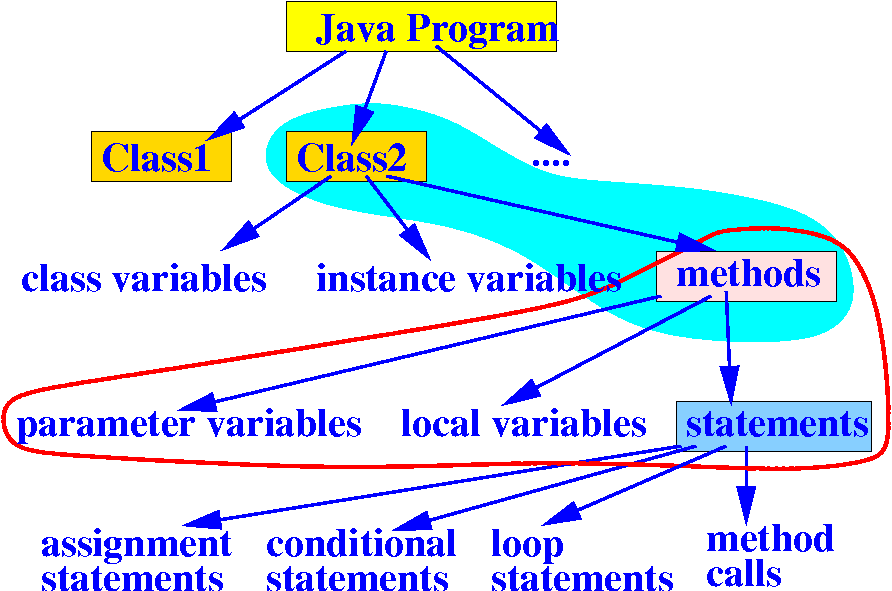
  • Recall:

    • A class in Java contains variables and methods:

    • A method contains statements that performs an important task

  • Java provides many Mathematical methods stored in a class called Math

Java's Math class

  • Some of the Math methods defined in the Math class of Java's library:

     public class Math
     {
        public static double sin(double x) { ... }
        public static double cos(double x) { ... }
        public static double tan(double x) { ... }
    
        public static double exp(double x) { ... }            // ex
        public static double log(double x) { ... }		  // Natural log
        public static double log10(double x) { ... }
        public static double pow(double a, double b) { ... }  // ab
        public static double sqrt(double x) { ... }           // √x
    
        public static double random( ) { ... }
    
        public static double max(double a, double b) { ... }
        public static double min(double a, double b) { ... }
        public static double abs(double x) { ... }           // absolute value  
     }
      

How to use a method in Java's Math class

  • How to invoke a method in Java's Math class:

       Math.methodName( ... )
    

    Example:   compute (1) the square root of 49 and (2) 23:

    public class MathMethods
    {
       public static void main(String[] args) 
       {
           double x;
           
           x = Math.sqrt(49);
           x = Math.pow(2, 3);
       }
    }  

DEMO: demo/04-Math+String/01-Math-class/MathMethods.java

Compute the distance between 2 points

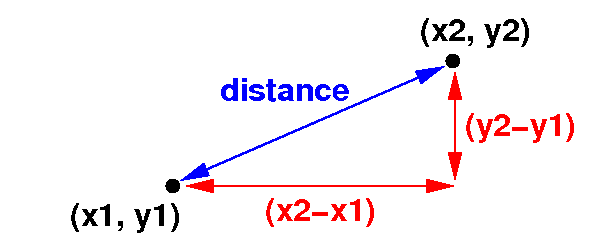
  • The mathematical formula to compute the distance between a point (x1, y1) and another point (x2, y2) is:

      distance = √(x2 - x1)2 + (y2 - y1)2  

  • We will use this formula to write a program to compute the distance between 2 points next

Compute the distance between 2 points

  • Java program that computes the distance between 2 points:

    import java.util.Scanner;
    
    public class Distance
    {
       public static void main(String[] args) 
       {
           Scanner input = new Scanner(System.in);
           double x1, y1, x2, y2, distance;
           
           // Read in the coordinates (x1,y1) and (x2,y2)
           x1 = input.nextDouble();
           y1 = input.nextDouble();
           x2 = input.nextDouble();
           y2 = input.nextDouble();
           
           distance = Math.sqrt( Math.pow((x1-x2), 2)
                               + Math.pow((y1-y2), 2) );
       }
    } 

DEMO: demo/04-Math+String/01-Math-class/Distance.java