The selection-statement or if-statement


  • The if-statement:

    • The if-statement allows a computer program to select different paths of execution

  • Java has 2 forms of if-statements:

    • The one-way if-statement   or (simply as) the if-statement

    • The two-way if-statement   or the if-else-statement


  • The if-statements are also called:

    • Selection statements

The one-way if-statement

  • The one-way if-statement allows a computer program to select between:

    1. Execute some statements         and

    2. Skip the statements


  • Syntax of the one-way if-statement:

        if ( boolean-expression )
            one-statement ; // statement executed if boolean-expr is true
    
     or:
    
        if ( boolean-expression )
        {
            statement1; // statements executed if boolean-expr is true
            statement2;
            ...
        }
    

  Example one-way if-statement  

  • Consider the following Java program:

    public class Demo1
    {
        public static void main(String[] args)
        {
            Scanner input = new Scanner(System.in);
            double  radius;
            double  area;
    
            System.out.print("Enter a radius: ");
            radius = input.nextDouble();
     
            if ( radius >= 0 )
            {
                // Compute and print area ONLY when radius >= 0
                area = 3.14159 * radius * radius;
                System.out.println(area);
            }
       }                       
    }   
    

    Program will only print the area if you enter a radius ≥ 0

DEMO: 03-selections/02-if-intro/Demo1.java

Flow chart

  • Flow chart = a diagram showing the pathways of program execution

  • Flow chart elements:

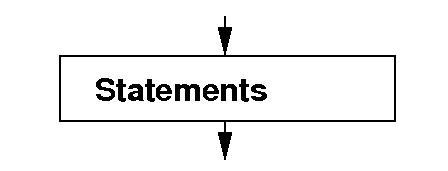
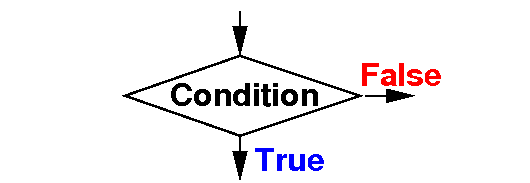
    Action Selection
    Meaning:
    • execute the statements (and continue)
     

    Meaning:
    • If Condition is True, continue in the True branch
    • Otherwise, continue in the False branch

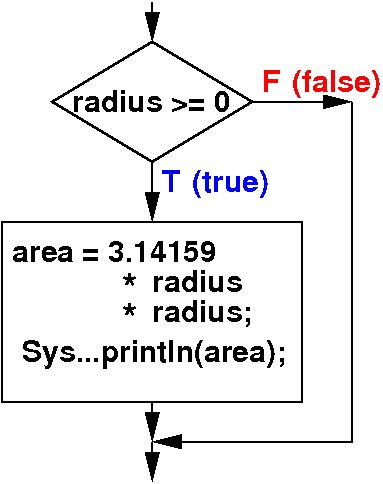
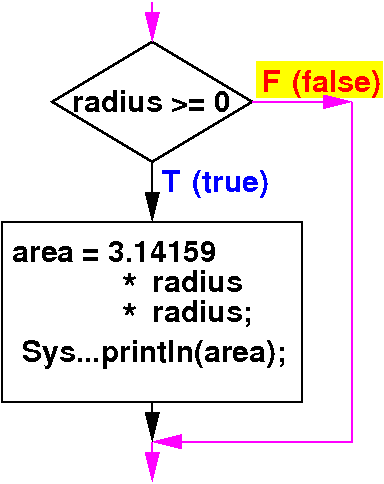
Flow chart of the one-way if-statement

  • Flow chart for the one-way if-statement:

    If-statement Flow chart
     if ( radius >= 0 )
     {
        area = 3.14159 * radius * radius; 
        System.out.println(area);
     }


Flow chart of the one-way if-statement

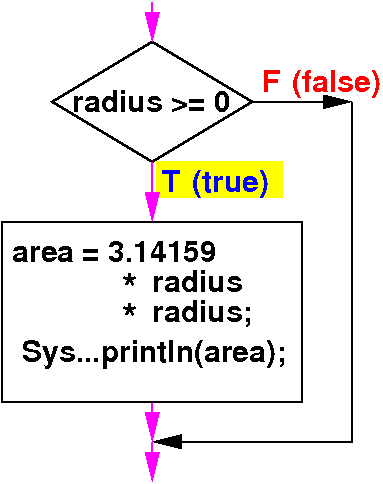
  • Program execution pathway when the condition in one-way if-statement is true:

    If-statement Flow chart
     if ( radius >= 0 )   // True case
     {
        area = 3.14159 * radius * radius; 
        System.out.println(area);         
     }


  • When the condition is true:

    • The statement(s) inside the one-way if-statement wil be executed

Flow chart of the one-way if-statement

  • Program execution pathway when the condition in one-way if-statement is false:

    If-statement Flow chart
     if ( radius >= 0 )   // False case
     {
        area = 3.14159 * radius * radius; 
        System.out.println(area);
     }
    
     // Statements inside the
     // if-statement are
     // skipped


  • When the condition is false:

    • The statement inside the one-way if-statement will be skipped

Example one-way if-statement:    Check if a number is even

Write a Java program that reads in an int number and print the message "Even" if the number is even

import java.util.Scanner;

public class IsEven 
{
   public static void main(String[] args) 
   {
      Scanner input = new Scanner(System.in);

      System.out.println("Enter an integer: ");

      int number = input.nextInt();    // Input number

      // Check if number entered in even
      if ( number % 2 == 0)
      {
         System.out.println("Even");
      }
   }
} 

DEMO: 03-selections/02-if-intro/IsEven.java

Example one-way if-statement    Order 2 numbers

Write a program that reads in 2 int numbers into x and y and the program will re-arrange their values so that the value in x is always less (or equal to) the value in y


Program in psuedo code:

public class ExchangeNums 
{
   public static void main(String[] args) 
   {
      read in x;       // Read in the numbers
      read in y;

      if ( x > y )     // If wrong order, exchange x and y
      {
         switch the values in x and y
      }
   }
} 

Example one-way if-statement    Order 2 numbers

Write a program that reads in 2 int numbers into x and y and the program will re-arrange their values so that the value in x is always less (or equal to) the value in y

import java.util.Scanner;

public class ExchangeNums 
{
   public static void main(String[] args) 
   {
      Scanner input = new Scanner(System.in);

      int x = input.nextInt();    // Read in the numbers
      int y = input.nextInt();

      if ( x > y )  // If wrong order, exchange x and y
      {
         int help;

         help = x;      // Program technique that we learned before
	 x = y;         // See: 
	 y = help;
      }
   }
} 

DEMO: 03-selections/02-if-intro/ExchangeNums.java

The two-way if-statement

  • The two-way if-statement allows a computer program to select between:

    1. Execute one group of statements         and

    2. Execute another group of statements


  • Syntax of the two-way if-statement:

        if ( boolean-expression )
            then-statement ; // statement executed if boolean-expr is true
        else
            else-statement ; // statement executed if boolean-expr is false
    
     or:
    
        if ( boolean-expression )
        {   // then-part
            then-statement1; // statements executed if boolean-expr is true
            ...
        }
        else
        {    // else-part
            else-statement1; // statements executed if boolean-expr is false
            ...
        }
    

  Example two-way if-statement  

  • Consider the following Java program:

    public class Demo1
    {
        public static void main(String[] args)
        {
            Scanner input = new Scanner(System.in);
            double  radius;
            double  area;
    
            System.out.print("Enter a radius: ");
            radius = input.nextDouble();
     
            if ( radius >= 0 )
            {
                area = 3.14159 * radius * radius;
                System.out.println(area);
            }
            else
                System.out.println("Illegal radius");
       }                       
    }   
    

    Program prints area if you enter a radius ≥ 0 otherwise prints "Illegal radius"

DEMO: 03-selections/02-if-intro/Demo2.java

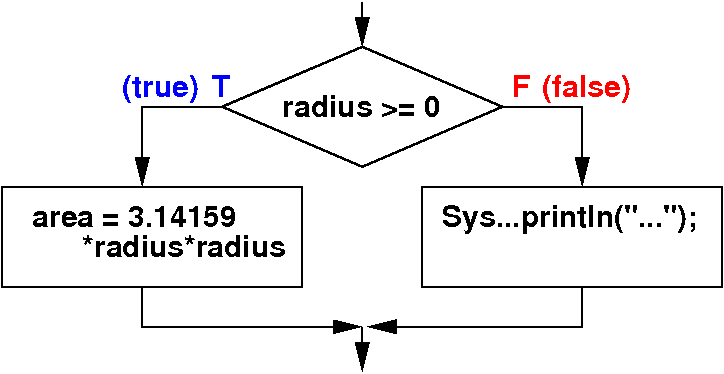
Flow chart of the two-way if-statement

  • Flow chart for the two-way if-statement:

    If-else-statement Flow chart
     if ( radius >= 0 )
     {
        area = 3.14159 * radius * radius; 
        System.out.println(area);
     }
     else
     {
        System.out.println("Illegal ...");
     }


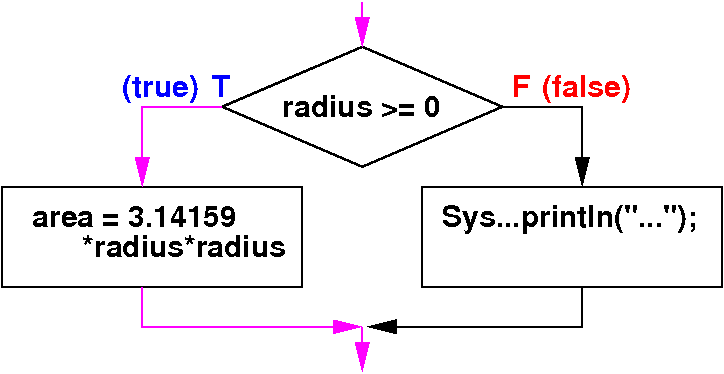
Flow chart of the two-way if-statement

  • Program execution pathway when the condition in one-way if-statement is true:

    If-else-statement Flow chart
     if ( radius >= 0 )   // True case
     {
        area = 3.14159 * radius * radius; 
        System.out.println(area);         
     }
     else
     {
        System.out.println("Illegal ...");
     }
    

  • When the condition is true:

    • The statement(s) inside the "then"-part of the two-way if-statement will be executed

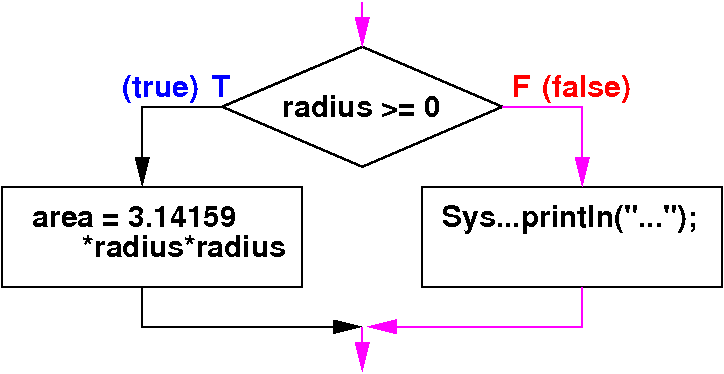
Flow chart of the two-way if-statement

  • Program execution pathway when the condition in two-way if-statement is false:

    If-else-statement Flow chart
     if ( radius >= 0 )   // False case
     {
        area = 3.14159 * radius * radius; 
        System.out.println(area);
     }
     else
     {
        System.out.println("Illegal ...");
     }
    

  • When the condition is false:

    • The statement(s) inside the "else"-part of the two-way if-statement will be executed

Example two-way if-statement:    Print whether a number is even or odd

Write a program that reads in an int number and print "Even" if the number is even and "Odd" otherwise

import java.util.Scanner;

public class MyProg 
{
   public static void main(String[] args) 
   {
      Scanner input = new Scanner(System.in);

      System.out.println("Enter an integer: ");
      int number = input.nextInt();

      if ( number % 2 == 0)
      {
         System.out.println("Even");
      }
      else
      {
         System.out.println("Odd");
      }
   }
} 

DEMO: 03-selections/02-if-intro/IsEvenOrOdd.java

Example two-way if-statement:    Find the maximum of 2 numbers

Write a program that reads in 2 double numbers x and y and find the maximum of the numbers and assign the maximum to the variable max

import java.util.Scanner;

public class FindMax 
{
   public static void main(String[] args) 
   {
      Scanner input = new Scanner(System.in);

      double x = input.nextDouble();
      double y = input.nextDouble();
      double max;

      if ( x >= y )
      {
          max = x;
      }
      else
      {
          max = y;
      }
   }
} 

DEMO: 03-selections/02-if-intro/FindMax.java